

You find the exact right thing on a small store's site and save it to that store's wishlist. A week later you find something else somewhere else, and it goes on a second list. The good mug is in a browser tab. By the time someone asks what you'd like for your birthday, the honest answer is spread across four retailers, a screenshot, and your own memory, so you say "oh, anything," and get a candle.
A universal wishlist is the fix, and it's a simple idea: one list that holds things from anywhere, with one link you can send to anyone.
What a universal wishlist actually is
A universal wishlist is a wishlist that isn't tied to a single store. Instead of living inside one retailer's account and only holding that retailer's products, it lives somewhere neutral and takes anything you can point at: a jacket from a chain, a print from an independent maker, a gadget from a specialist store, a ticket to a show.
"Universal" gets used loosely, so it's worth being concrete. A list earns the name when it does three things:
- It takes items from any store. If you can open the product page, you can put it on the list: the photo, the name, and the link come with it.
- Anyone can open it. The people buying for you shouldn't need an account, an app, or an invitation to see what you want.
- Items can be marked as taken. Once someone claims a gift, everyone looking at the list can see it's spoken for, so two people don't turn up with the same headphones.
The first point is what makes it universal. The other two are what make it worth having.
Why store wishlists run out of road
A store wishlist is a catalog tool, and it's good at that job. The limit is structural: it can only hold what that store sells. Save enough things and you end up with several half-lists in several accounts, which is the same problem as no list at all.
For years there was a workaround, a browser button that pushed products from other sites into your store list. Amazon offered one through its Amazon Assistant extension, and then withdrew it. The notice on Amazon's own extension listing is blunt: "We have made the decision to discontinue Amazon Assistant on March 28, 2023. From that date you will no longer be able to use Amazon Assistant." (Amazon Assistant for Firefox, published by Amazon.com). Anything already saved stayed put; adding new things from elsewhere stopped.
That's not a complaint about any one retailer. It's the point: a list owned by a store is going to be about that store's products, sooner or later. If you want a list that matches what you actually want, it has to sit somewhere that doesn't sell anything.
How to make a universal wishlist
It takes about five minutes.
- Keep it somewhere neutral. Use a wishlist app rather than a retailer account, so the list belongs to you and not to a catalog. If you want to compare the options first, we've written up the wishlist apps worth looking at.
- Add things from wherever you find them. Share or paste a product link from any store and Wishes pulls in the photo, the title, and the link for you. You can build your list on the web or in the iPhone and Android apps. Owning one takes a free account. The people you send it to just open a web page, with no account needed to look through it. (Changing an item after you've added it is an app job for now; on the web you can add and remove.)
- Say what "this one" means. Size 38, lilac, the 500ml one, any color. A wishlist fails on vagueness more than anything else: "something cozy" sends people straight back to guessing, and guessing is what you're trying to remove.
- Spread the price range. A few small things next to one or two bigger ones. A colleague and your parents are shopping from the same list, and neither should feel boxed in.
- Share one link. Send the same link to everyone, or drop it into the group chat. Nobody needs to download anything to use it.
Making a list, sharing it, and booking from it are free in Wishes: three wishlists are included, and nobody ever pays to book a gift. Anyone can open your link and look through the list without an account. Booking an item is the one step that needs a free sign-in with Apple or Google, so the list knows who has claimed what and can stop two people from claiming the same thing. Building a list together with a partner is part of Wishes Plus.
The things a store list can't hold
This is where a universal list earns its keep. Once the list isn't tied to a catalog, it can hold the things you actually want:
- The independent maker. The ceramicist on Instagram, the small label, the store that only exists in one city and ships from its own site.
- The specialist store. Hobby gear (climbing, baking, model kits, plants) usually lives at a retailer nobody's default account is with.
- Experiences. A concert ticket, a pottery class, a day out. Save the booking page the same way you'd save a product.
- The thing you keep almost buying. Whatever has been sitting in a cart for a month is the single best item you can put on a wishlist.
- The big one. The expensive thing you're saving up for. Nobody has to buy it, but it tells people what you're aiming at, which is useful information on its own.
How booking works
This is the part that makes a shared list better than a group text.
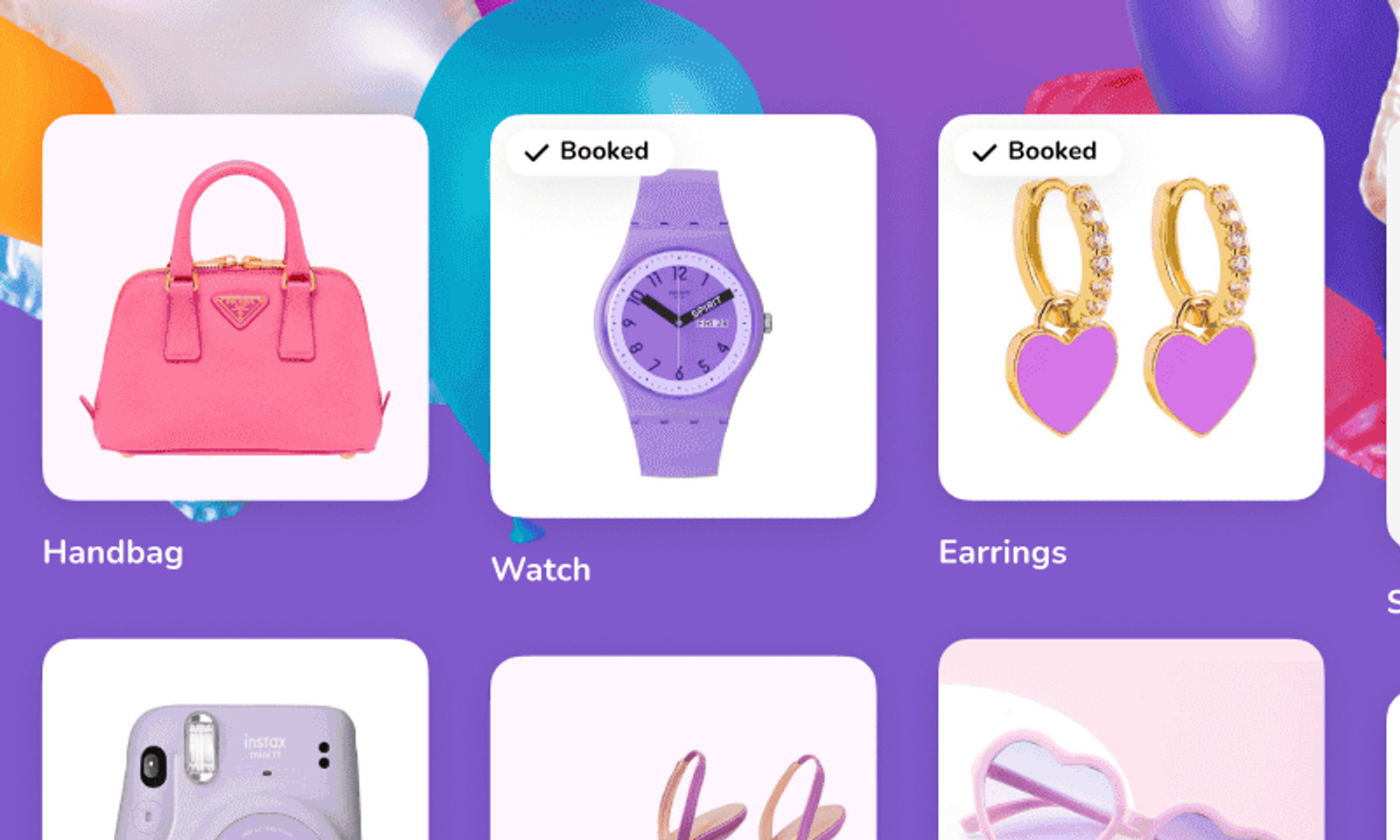
When someone opens your link and books an item, it's marked as taken so nobody else buys it. Everyone shopping from the list sees what's still available, and two people don't end up with the same headphones.
One thing to know if the list is yours: booked items show as taken on your own copy of the list too, and Wishes notifies you when something gets claimed. It isn't a blind list. If you'd rather keep the surprise, the simple answer is not to look between sending the link and the day itself.
No spreadsheet, no "did anyone already get the coffee grinder?" thread, no two of everything.
When a store list is still fine
Worth saying plainly: if your shopping genuinely happens in one place, a store wishlist is simpler and you should use it. Same for a registry the retailer itself runs, if you're only registering there.
A universal list is the answer to a specific problem: that what you want is scattered, and the people buying for you are too. If that's not your problem, you don't need one.
Which universal wishlist apps really work with any store
Here is the awkward part of shopping for one: nearly every tool in this category says it works with any store, so the phrase decides nothing. What separates them is the step before that, how an item actually gets from a product page onto your list. Some take a pasted link on your phone. Some are built around a button you install on a desktop browser. One is a catalog wearing the word.
What follows is each tool in its own words, from its own site or App Store listing.
The ones you add to by pasting a link
This is the most portable mechanism, because a link is the one thing every store and every phone can hand you.
- Elfster: its App Store listing says it takes items from "any online store" and will "fetch item details automatically" once you paste the link. Genuinely better than us if the occasion also needs a Secret Santa draw with exclusion rules or emailed assignments; ours is the simple version, with neither.
- GoWish: "you can add wishes to your wishlists from any online store in the world - there are no limitations," per its listing. Better than us at hiding purchases from you completely: it says "your guests can see what is being reserved by other guests - without you, of course, being able to see it yourself."
- Giftster: "add items from any store in the world - a universal wishlist," with a "fetch" step that auto-fills the details from a web link. Better than us for an extended family that will all join one private group and reuse it every year.
- GiftList: "GiftList works with every online retailer. Paste a link from any site and we'll do the rest." It has both mechanisms, a link paste and an extension, and the most generous free tier of the set: "free forever, no limits on lists or items."
- Wishes: paste a product link from any store and the photo, title and link come with it. On a phone you can also share a page to Wishes straight from the share menu while you are browsing. There is no Wishes browser extension, which is the honest gap in this list.
The ones built around a browser button
A browser extension is a real mechanism, and for someone who does their shopping on a laptop it is the fastest one there is. The cost is that it is a desktop habit. Install it and adding is one click; browse on your phone instead and you are back to the link.
- Things To Get Me: calls itself "The Free Universal Wish List" and adds items through a free browser plugin for Chrome, Firefox and Safari that lets you "add products to your list while you browse the web." It is also the only one here that asks for nothing to start: "no sign-up required."
- MyRegistry: "All Stores, One Registry," and the mechanism is explicit, "just click on the extension to add any item from any store in the world to your gift list." Better than us if the gift is a cash fund or you are pulling several store registries into one, though it says a "small transaction fee" applies to a cash fund.
The one that is a catalog
Amazon Wish List is the exception, and it is worth naming plainly rather than leaving it implied. It holds Amazon's own products, and the browser button that once pushed items from other sites into an Amazon list was withdrawn in 2023, as the notice quoted earlier in this post says. That makes it a store wishlist with a very large store behind it, which is a fine thing to be. It is just not the thing this page is about.
So which one should you pick
On the store-agnostic axis alone, and nothing else:
- Shopping on your phone, sending the list to people who won't install anything: Wishes. Paste or share from the share menu, and the link opens in a browser.
- Shopping on a laptop, adding as you browse: Things To Get Me or MyRegistry, whose extensions are the point of them.
- You want both mechanisms and no limits at all: GiftList.
- The list is for one family who will all sign up: Giftster.
- There is a gift exchange with exclusion rules attached: Elfster.
- You want every purchase hidden from you entirely: GoWish.
- Almost everything you'd ask for is on Amazon anyway: Amazon's own list. Here's how to make an Amazon wish list and share it.
- Almost everything is at Target or Walmart: that store's own list. Here's how to make a Target or Walmart wish list and share it.
For the wider field rather than this one axis, there is the wishlist apps worth looking at, and a head-to-head on the two family tools at Elfster vs Giftster.
Frequently asked questions
What is the best universal wishlist app?
It depends on where you shop and who has to open the list. If you add things on your phone and send the link to people who should not have to install anything, Wishes is the quickest path. If you add things on a laptop as you browse, MyRegistry and Things To Get Me are built around a browser extension and are faster there.
Which wishlist app works with any store?
Most of them, which is why the claim alone is not much help. Elfster takes items from "any online store", Giftster says "add items from any store in the world", and GiftList says it "works with every online retailer". Amazon Wish List is the real exception, because it holds Amazon's catalog.
Do I need a browser extension to make a universal wishlist?
No, and it depends which tool you pick. Things To Get Me and MyRegistry are built around one, while Wishes, Elfster, GoWish and Giftster all take a pasted product link instead. Wishes has no browser extension at all, and on a phone you can share a page to it from the share menu while you browse.
Is there a free universal wishlist?
Yes, all of them are free to start. GiftList is the most generous, saying it is "free forever, no limits on lists or items", and Things To Get Me says it is free and "always will be". Wishes is free for your first three wishlists, with booking always free for the people giving, and Wishes Plus lifts that limit.
Start your list
One list, anything on it, one link. That's the whole idea, and it works the same whether the occasion is a birthday, a wedding registry, a baby registry, a housewarming, or Christmas.
Get Wishes free and make your list today. If you get stuck, the help center has the step-by-step.